
Simanaitis Says
On cars, old, new and future; science & technology; vintage airplanes, computer flight simulation of them; Sherlockiana; our English language; travel; and other stuff
TRIPPIN’ THROUGH KEYBOARDS
I’VE BEEN ENJOYING Michael Arndt’s Snails & Monkey Tails: A Visual Guide to Punctuation & Symbols. One of its chapters is “Typography in the Digital Age,” which begins with that device so admirably named the “typewriter.” Here I glean tidbits about this ancient device as well as the latest offerings from the PC world and Apple land.
In QWERTY Quarter. Wikipedia describes, “Typically, a typewriter has an array of keys, and each one causes a different single character to be produced on paper by striking an inked ribbon selectively against the paper with a type element.”
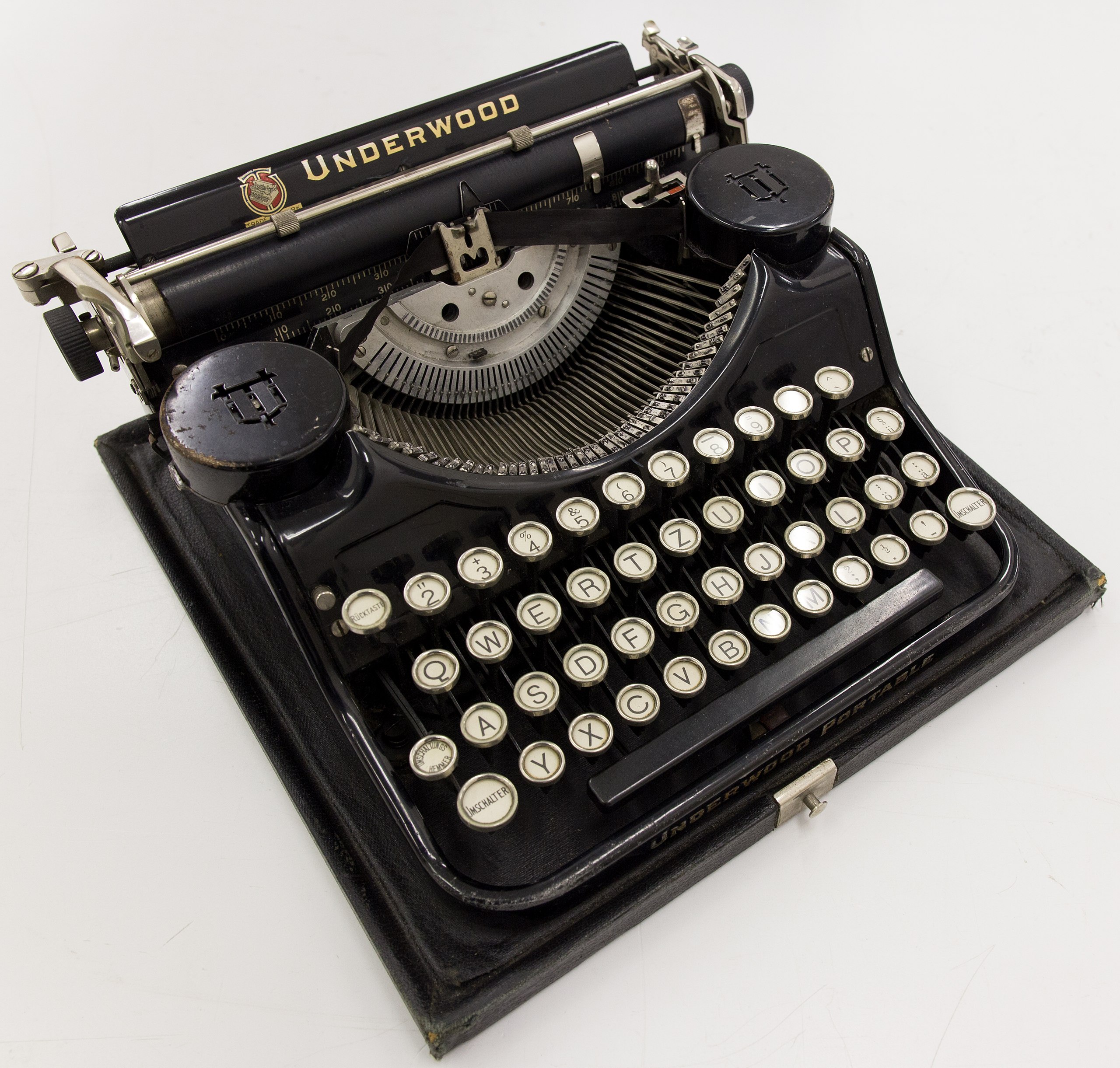
This particular Underwood has German-language keys. (Note Imschalter/Switch for English Shift.) Image by GodeNehler via Wikipedia.
“By the end of the 19th century,” Wikipedia recounts, “a person who used such a device was also referred to as a typewriter.” I’m reminded that in the earliest days of digital and analog computation, the operators (mostly women) were referred to as “the computers.”
Wikipedia continues, “The QWERTY keyboard layout, developed for typewriters in the 1870s, remains the de facto standard for English-language computer keyboards. The origins of this layout still need to be clarified…. One popular but possibly apocryphal explanation for the QWERTY arrangement is that it was designed to reduce the likelihood of internal clashing of typebars by placing commonly used combinations of letters farther from each other inside the machine.”
However, Wikipedia notes, “Contrary to popular belief, the QWERTY layout was not designed to slow the typist down, but rather to speed up typing. Indeed, there is evidence that, aside from the issue of jamming, placing often-used keys farther apart increases typing speed, because it encourages alternation between the hands.”
Lefty Versus Righty. Wikipedia observes, “In the QWERTY layout many more words can be spelled using only the left hand than the right hand. Thousands of English words can be spelled using only the left hand, while only a couple of hundred words can be typed using only the right hand.”
However, my editorial mentor, Larry Givens at the Society of Automotive Engineers, taught me “OH MY KILLJOY MOLLY, I LOOK IN UPON MY JOLLY POLO PONY UP IN HILLY HONOLULU.”
So take that, Wikipedia.

Typewriters Versus Computer Keyboards. Michael Arndt writes in Snails & Monkey Tails, “Typewriters lacked enough keys to type all the necessary characters, so people made do with the existing keys…. There was no dedicated exclamation point key. Instead apostrophes were backspaced over a period….”
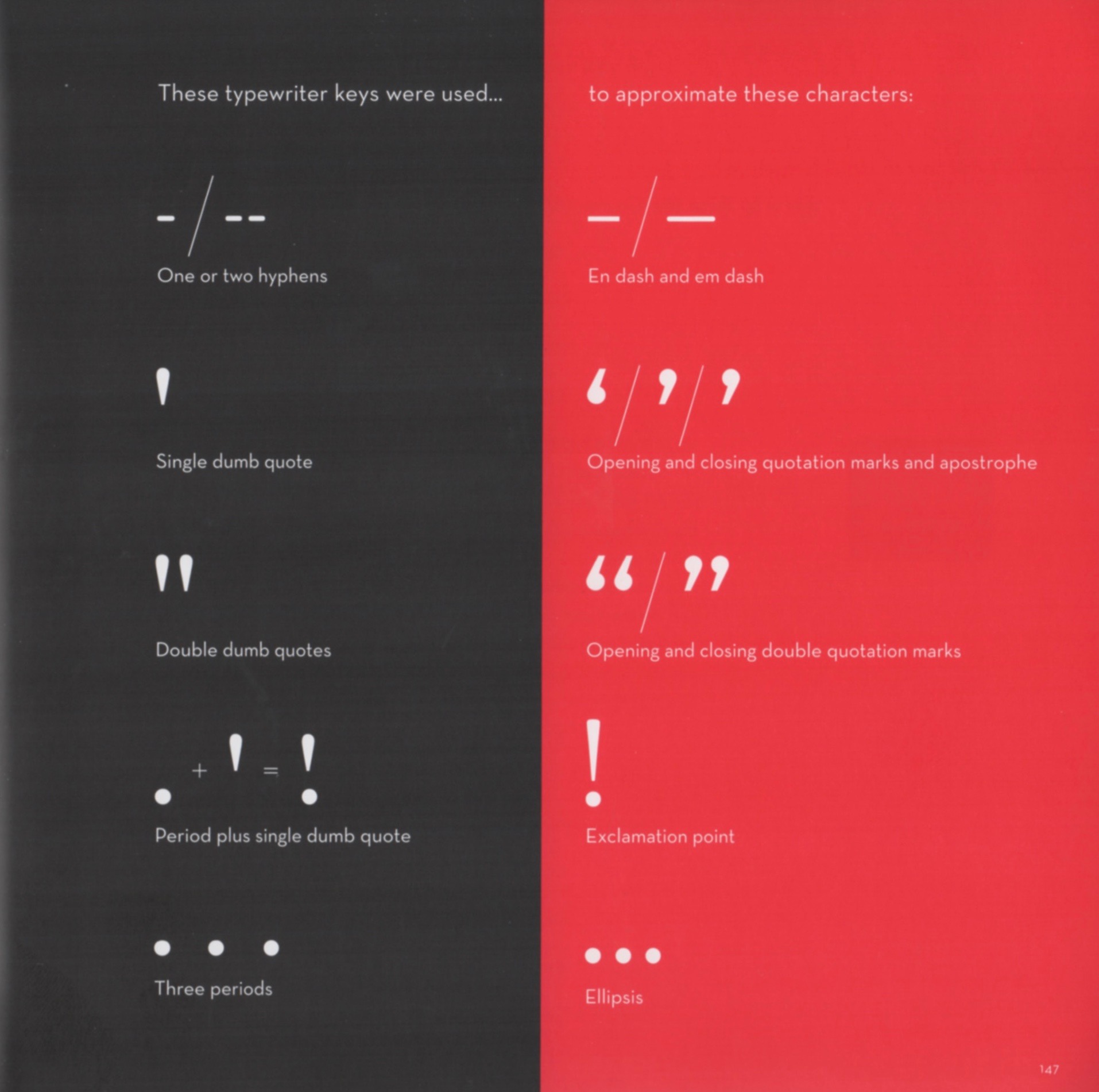
Here are some typewriter make-does. This and the following images from Snails & Monkey Tails.
PC Versus Apple. I confess to being computerdexterous: My SimanaitisSays composition takes place on an Apple iMac 27, the styling and monitor size I much admire. Indeed, I’ve partitioned the device to be half Apple OS and the other half Windows (specifically for Microsoft Flight Simulator and its aeroplane-constructing GMax).
Alas, it turned out a Windows update later eliminated sounds on the system’s fltsim. And, about that time, I had need for an updated laptop. I opted for a Dell Inspiron that now supports all of my GMax and Microsoft Flight Simulator.
The two share scanner and printer, but are otherwise independent machines, with large-capacity thumb drives used for transfers.
Thus, I regularly use two different keyboards, this Apple with numbers located off to the right, and my Dell’s keyboard with a separately purchased number pad.
Different Strokes for Different Folks…. Arndt’s “Typography in the Digital Age” notes, “Computer technology can create correct typographic characters and optical spacing, so only one space is needed after a period that ends a sentence (once universally called a full stop for its role in that function)…. Computer fonts optically space characters and have a rich variety of glyphs [specific versions of typographic characters], including a dedicated ellipsis character (…).”
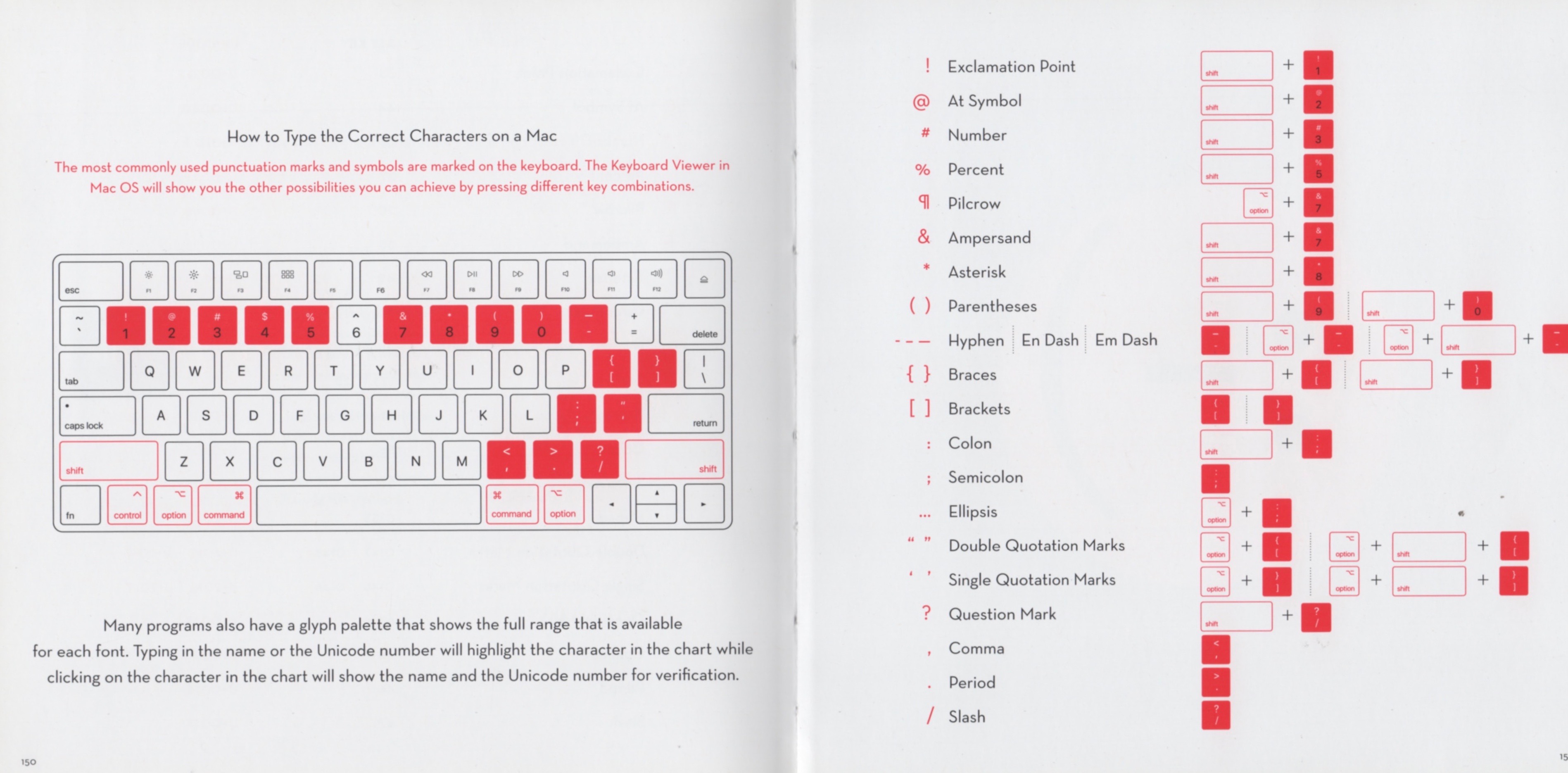
Arndt thoughtfully includes “How to Type the Correct Character on a Windows PC” and “How to Type the Correct Character on a Mac.”
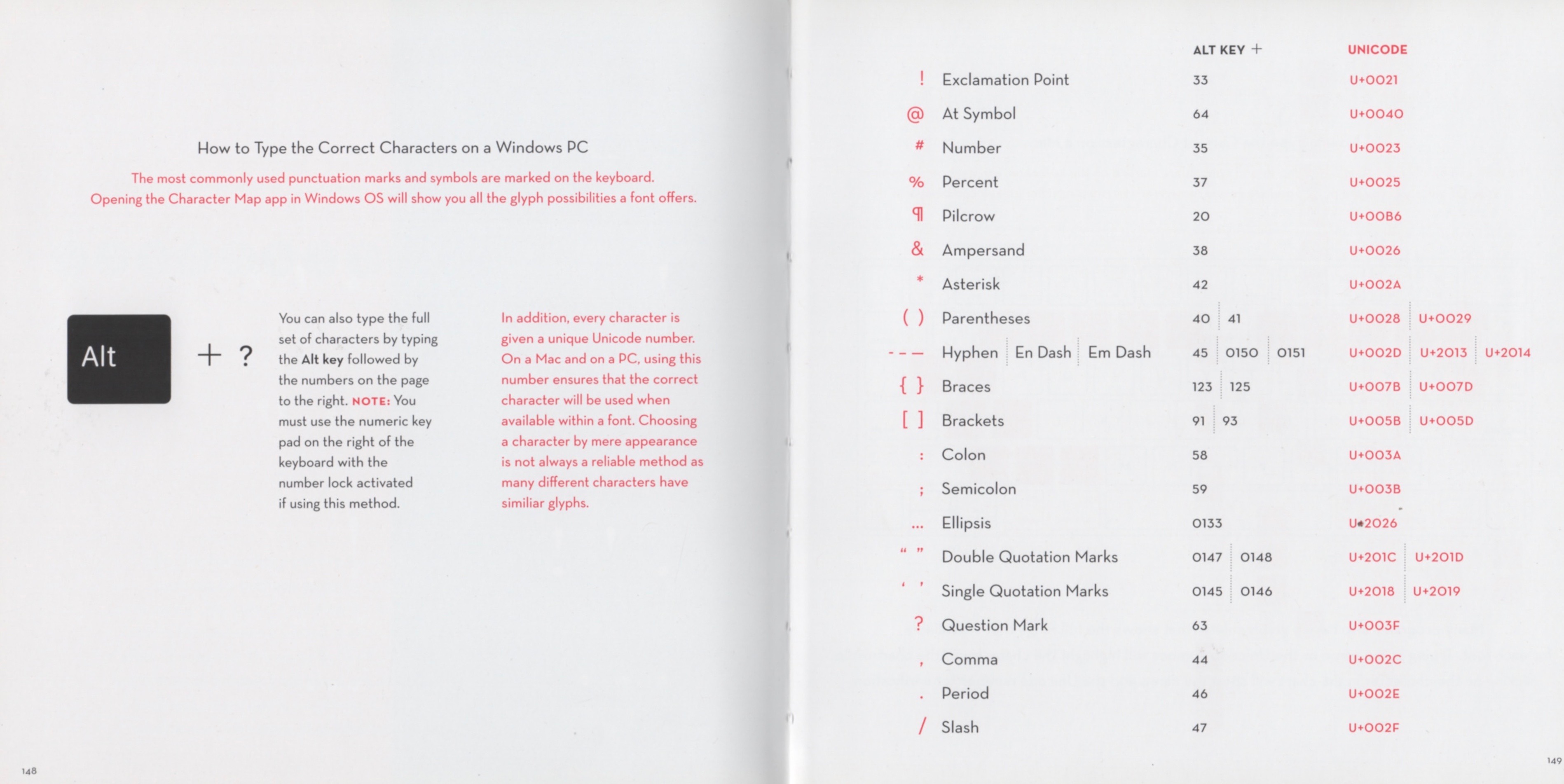
Above, the Windows chart. Below, the Mac equivalent.
Alt Versus Option. “You can also type the full set of characters by typing the Alt key followed by the numbers on the page to the right [er, above here in the Windows chart].”
Only, of course, I’m writing this on my iMac, the keyboard of which doesn’t have an Alt key. No big deal, as there’s a Mac equivalent as well.
On the Mac, everything works with either the Shift or Option key. I’ve gotten spoiled to type é simply by Option + e. There’s also a useful collection of characters using Option + numerals up top: 1-0 yielding ¡ ™ £ ¢ ∞ § ¶ • ª ø. Option + QWERTY yields Œ ∑ ´ ® † Á.
My Missing Kern. I find a special typographic challenge with nested quotations: “Wikipedia describes, ‘Something or other.’” Correct enough, but with proper kerning it would look better with a mite of a space between the ’ and the ”. Sans kerning, I settle for an added full space: or other.’ ” which looks better to my eye. Occasionally, though, a widowed ” (discovered later) calls for some rewording.
All in good fun. I usta be an editor, y’know. ds
© [Option g] Dennis Simanaitis, SimanaitisSays.com, 2024
 Simanaitis Says
Typewriters … took my basic typing class in high school using non-electric Olivettis. They had a IBM Executive (remember trying to count the spacing with them?) in back for those who wanted to try an electric. Mom had a big black Woodstock, similar to the Olivetti pictured. I was given a non-electric SCM portable for a Christmas present one year (big investment at the time!); it’s still around someplace, but I would need to find somebody selling a replacement ribbon if I wanted to use it again. Since getting a computer (first one was a Radio Shack Model 1 with a *very* nice keyboard, not really equaled for feel by any I’ve used since other than some IBM products though a couple of “gaming” keyboards have come close) and word processing software with a printer, the only thing I used the typewriter for was addressing envelopes; and even that is no longer necessary.
Oops. Underwood in the story, not Olivetti. Brain fart.
I have a 100+ year old LC Smith German Keyboard typewriter that sits proudly with my other “treasures” on a shelf in my home office. Beautiful to look at. It was well preserved when I got it about 5 years ago when a sort-of relative died.
“Kerning” is a new word for me. I also prefer a space between single and double quotes when nesting. Definitely easier on the eyes.